Showing posts with label JavaScript. Show all posts

Saturday, June 28, 2014

Primitive data types of JavaScript

JavaScript is a loosely typed language so you can use a variable without declaring it. JavaScript determines the type based on the value contained in the variable.
JavaScript supports primitive data types along with objects. The simple/primitives types in JavaScript are number, string, boolean, null and undefiend. Everything except these are objects. Before starting on primitive data type; let's understand one of the important operator, typeof.

typeof operator : This operator returns data type of an argument as string.  This can be very helpful in determining the type. The return value of this operator for primitives could be - number, string, boolean or undefined. Apart from this everything else is of type object; so arrays are objects, functions are objects, and of course objects are objects.

Now, we are armed to start on data types in detail:

 Number

JavaScript uses number type to represent floating point numbers as well as integers. So 1 and 1.0 both are same value and of same type. It gets internally represented as 64-bit floating point (same as Java's double). This saves you from type errors because all you need to know about a number is that it is a number. It supports octal (starting with 0) and hex or hexadecimal number (starting with 0x) as well. Below screenshot shows some of the common operations on numbers.


String

In JavaScript, string is sequence of characters placed between either single quote or double quote. All characters are 16 bit wide. It doesn't support character type; so to represent character, make a string with just a single character. Strings in JavaScript are immutable; so once a string is created it can never be changed. It supports attributes and methods as well (just like normal objects).
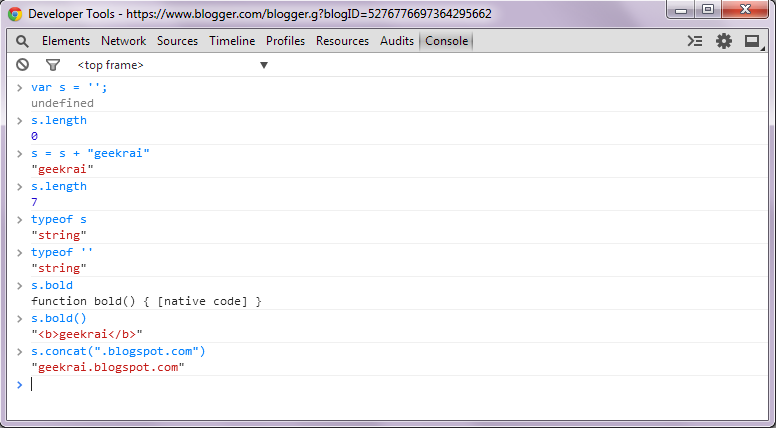

Boolean

Boolean supports only two values true and false (without quotes). The operator typeof returns "boolean" if the value is either true or false. Boolean is also immutable and has methods just like numbers and strings

Undefined

When you declare a variable but don't initialize it then JavaScript will initialize it behind the scene for you with the value as undefined.

Null

Special data type which can have only one value i.e. null. It means no value. So if a variable has null value; it's still defined (contrary to undefined).


Saturday, October 5, 2013

Handling Global Variables in Ext JS

Classes don't exist in JavaScript but Ext JS does a fine job in emulating classes as found in object oriented programming languages. This means everything in Ext JS is a class and these classes mostly fall in either of these categories; Model, View, Controller, and Store. So if you could map any new class to either of these category, things fall in place nicely. Now what if something don't fall in either of these ?

What if you need to move common labels and constants to a separate class. If you are writing plain JavaScript then it's quite trivial but NOT so obvious in Ext JS. Let's figure out how to handle labels or common variables in Ext JS.

Singleton Class

Ext JS has support for singleton classes. By definition, singleton can't be instantiated more than once. Global or common variables can be created using a singleton class.

     Ext.define("App.Constants", {
             singleton  : true,  
             
             BASE_URL : "http://localhost:8080/",
             LABLE_HEADER : "geekrai.blogspot",
             TIMEOUT : 6000
     });

Please, note that, singleton property is set to true. That's all we need to do to convert a class into a singleton class. You can test if it's indeed a singleton by creating an instance of above class :

      Ext.create("App.Constants"); //Throws error

Global variables are added in class as key value pair. Save above content in file Constants.js. File can be created at same level as other packages like model, view etc.

Accessing Constants in Application

Above class needs to get loaded in application to successfully access properties mentioned above. As it holds some of the global variables so ideal place will be to load it inside app.js.

     Ext.application({  
           // include model, view, controller etc.

           requires: ['App.Constants']

     });

Now we are good to access variables in any class as App.Constants.<KEY>.
console.log(App.Constants.TIMEOUT);


*** You can also use Ext JS singleton to create utility classes. 

Thursday, September 26, 2013

Accessing view in the controller of Ext JS 4

Controller in Ext JS framework work as a glue between view, model, store (and data). It can listen to different events on the view/UI and handle events. So if you want to manipulate a particular view then the most appropriate place would be the corresponding controller.

Let's take a simple view named as myView as shown below. I have removed other attributes for making it simpler. Things to note here is alias of the view.

 Ext.define('App.view.myView', {
     extend: 'Ext.panel.Panel',
     alias: 'widget.myview',
    //..

 });

Access View in Controller

Controller might access the same UI component time and again. Ideal approach would be to do it only once and then save a reference to avoid subsequent searches. Controllers provide an easy approach for the same. We can define references using selectors and then we can use them in any of the methods in controller. By using refs array we can define as many references as we want.

Each reference should be an object with at least two configurations. First is the ref property, which is the name of our reference, and second is the selector for the reference.  You should be careful to give selector name as the alias without the keyword 'alias'. And ref is used to give a meaningful name for the same. There is no restriction on ref; you can give any name. And after this view will be available through a getter method as shown below :

 Ext.define('App.controller.myController, {
     extend: 'Ext.app.Controller',

       views: ['myView'],  //Not Required

       refs: [
{ref: 'viewz', selector: 'myview'} 
],
        init: function(application) {
          //event listners 
        },
       hideView: function(){
         var vu= this.getViewz();
        vu.hide();
      }
 });
 

This helps in speeding up the process as searching for the UI/view component will be done only once. And you can use it at multiple places without causing any performance issue.