Showing posts with label String. Show all posts

Saturday, June 28, 2014

Primitive data types of JavaScript

JavaScript is a loosely typed language so you can use a variable without declaring it. JavaScript determines the type based on the value contained in the variable.
JavaScript supports primitive data types along with objects. The simple/primitives types in JavaScript are number, string, boolean, null and undefiend. Everything except these are objects. Before starting on primitive data type; let's understand one of the important operator, typeof.

typeof operator : This operator returns data type of an argument as string.  This can be very helpful in determining the type. The return value of this operator for primitives could be - number, string, boolean or undefined. Apart from this everything else is of type object; so arrays are objects, functions are objects, and of course objects are objects.

Now, we are armed to start on data types in detail:

 Number

JavaScript uses number type to represent floating point numbers as well as integers. So 1 and 1.0 both are same value and of same type. It gets internally represented as 64-bit floating point (same as Java's double). This saves you from type errors because all you need to know about a number is that it is a number. It supports octal (starting with 0) and hex or hexadecimal number (starting with 0x) as well. Below screenshot shows some of the common operations on numbers.


String

In JavaScript, string is sequence of characters placed between either single quote or double quote. All characters are 16 bit wide. It doesn't support character type; so to represent character, make a string with just a single character. Strings in JavaScript are immutable; so once a string is created it can never be changed. It supports attributes and methods as well (just like normal objects).
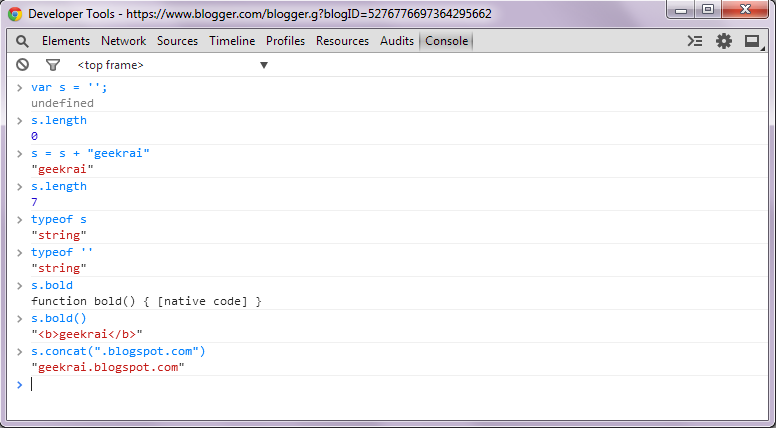

Boolean

Boolean supports only two values true and false (without quotes). The operator typeof returns "boolean" if the value is either true or false. Boolean is also immutable and has methods just like numbers and strings

Undefined

When you declare a variable but don't initialize it then JavaScript will initialize it behind the scene for you with the value as undefined.

Null

Special data type which can have only one value i.e. null. It means no value. So if a variable has null value; it's still defined (contrary to undefined).


Saturday, May 10, 2014

Using Comparator to change sort technique in Java

Java provides ability to sort an array (or collection ), if the contained type properly implements java.lang.Comparable<T> interface. If type is comparable; sort method from Arrays class can be used for sorting the container (array or collection). This same utility is used by Collections API as well. You can design a type keeping in mind a natural sorting techniques, but there could still be a possibility to sort it differently. In such scenario, it doesn't make sense to go back to the class and modify the definition of the method. Some time, it might not be even feasible (to modify the class)!

In this post, I will be mentioning how can we provide a different ordering technique (other than one provided by class). The approach discussed in the post is applicable for any type (inbuilt or custom); but to make it simpler, I have considered Java's inbuilt type, String. Let's start with an example :

 String[] country = { "India", "US", "France" };  
 Arrays.sort(country);  
 System.out.println(Arrays.toString(country));  
 // Output : [France, India, US]  

Above snippet is able to sort array of strings because String class implements Comparable interface (i.e. provides implementation of compareTo(..) method)
To sort collections; Collections.sort(..) can be used.

Providing Custom Comparison 


So default comparison provided by String class, sorts the array in ascending order. What if you have to sort the above array in descending order?
Now modifying the compareTo(..) method of the String class is out of question (ditto the case, if you using a type from a jar). 

This is where the need for alternative comparison or ordering technique arises. Java provides another interface java.util.Comparator<T> to impose ordering on some collection of objects. This interface has compare(..) method to compare two objects of same type. So, we can create a Comparator<String> instance and pass it to the sort method. 

 import java.util.Comparator;  
 public class MyComparator implements Comparator<String> {  
      @Override  
      public int compare(String o1, String o2) {  
           return o2.compareTo(o1);  
      }  
 }  
 MyComparator my = new MyComparator();  
 Arrays.sort(country, my);  
 System.out.println(Arrays.toString(country));  
 //Output : [US, India, France]  

Note that the compare method in MyComparator class is basically calling compareTo method provided by String class. It has just reversed the order to reverse sort the array.

Java provides an inbuilt method to sort a collection in reverse order. So we don't need to re-invent the wheel but we should be aware of the logic.
Arrays.sort(country, Collections.reverseOrder());

Above approach is bit verbose; we can use anonymous class to make it more compact.
 import java.util.Arrays;  
 import java.util.Comparator;  
 public class OverrideDefaultSort {  
      public static String[] reverseSort(String[] country) {  
           Comparator<String> c = new Comparator<String>() {  
                @Override  
                public int compare(String o1, String o2) {  
                     return o2.compareTo(o1);  
                }  
           };  
           Arrays.sort(country, c);  
           return country;  
      }  
      public static void main(String[] args) {  
           String[] country = { "India", "US", "France" };  
           String[] c = OverrideDefaultSort.reverseSort(country);  
           System.out.println("Reverse Ordering:" + Arrays.toString(c));  
      }  
 }  
Output:
Natural Orering:[France, India, US]
Reverse Ordering:[US, India, France]

So second argument of sort method can take any comparator. Also above code can be even compacted further and Comparator can be provided inline inside the sort method. Below snippet sorts the array by size (or length) of the String.

 Arrays.sort(country, new Comparator<String>(){  
   @Override  
   public int compare(String o1, String o2) {  
       return Integer.compare(o1.length(), o2.length());  
   }  
 });  
Output:
Sort by length:[US, India, France]

So, sort in as many ways as you may wish !!!


Thursday, February 14, 2013

Interning String in Java

String class of Java API has a native method, intern().  This method is used for internalizing Java String. It's a process of creating a String pool where String objects with equal values are stored only once.

Method signature: 
public native String intern()

Straight from Java Doc
Returns a canonical representation for the string object.A pool of strings, initially empty, is maintained privately by the class String.
When the intern method is invoked, if the pool already contains a string equal to this String object as determined by the equals(Object) method, then the string from the pool is returned. Otherwise, this String object is added to the pool and a reference to this String object is returned.


It follows that for any two strings s and t, 

 s.intern() == t.intern() is true if and only if s.equals(t) is true.


All literal strings and string-valued constant expressions are interned.
public static void main(String[] args){
        String s = "abc";
        String d = "abc".intern();
        String f = new String("abc").intern();
        String g = new String("abc");
       
        System.out.format("  s == d : %b", (s==d));
        System.out.format("; s == f : %b", (s==f));
        System.out.format("; s == g : %b", (s==g));
        System.out.format("; s.equals(f) : %b", s.equals(f));
        System.out.format("; s.equals(g) : %b", s.equals(g));
    }
Ouptput :  s == d : true; s == f : true; s == g : false; s.equals(f) : true; s.equals(g) : true

So all strings except g in above case are interned.


Related Post : Changes to intern() method in Java 7